Matcher Scoring Profile PRO
The Matcher Scoring Profile is a project-wide configuration that controls exactly how Conio scores the similarity between a BOQ item and a rate table item. Every change you make here applies to both Match All and the live candidate previews — what you tune is what runs.
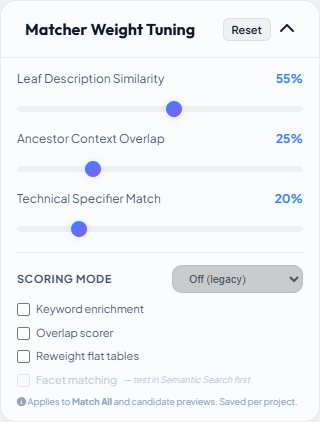
The profile is accessed via the Matcher Weight Tuning panel in the left sidebar of Scenario Studio.
The three scoring signals
Every match score is a weighted combination of three independent signals:
| Signal | Default weight | What it measures |
|---|---|---|
| Leaf | 55% | Direct similarity between the BOQ item's own description and the rate item description |
| Ancestor | 25% | Similarity between the BOQ item's heading hierarchy (e.g. "Substructure > Foundations") and the rate item's hierarchy |
| Spec | 20% | Overlap of extracted numeric specifications (dimensions, grades, depths) from both sides |
The three weights must always sum to 100%. Adjust them using the sliders in the tuning panel.
When to adjust weights
- Increase Leaf when your rate table descriptions closely mirror your BOQ wording — every token in the rate name also appears in BOQ leaf descriptions.
- Increase Ancestor when both the BOQ and rate table are hierarchical and the context (section headings) is the main distinguishing factor.
- Increase Spec when items in the same trade differ primarily by grade or dimension (e.g.
C-25vsC-20,10mm diavs16mm dia).
Preset selection
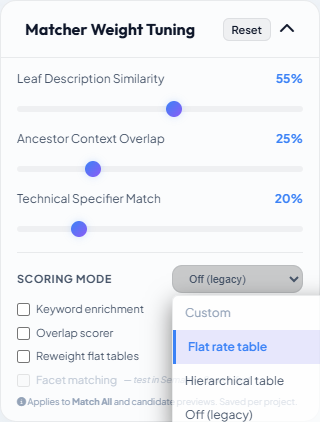
A preset dropdown configures the scoring flags in one step. Choose based on the shape of your rate table:
| Preset | What it enables |
|---|---|
| Flat rate table | Keyword enrichment ON, Overlap scorer ON, Reweight flat tables ON, Facet matching OFF |
| Hierarchical table | Keyword enrichment ON, Overlap scorer OFF, Reweight flat tables OFF, Facet matching OFF |
| Off (legacy) | All flags OFF — behaviour identical to the original matching algorithm |
If you toggle any individual flag after selecting a preset, the label changes to Custom.
Scoring flags
Keyword enrichment
Folds each BOQ item's AI-extracted description_keywords into the leaf text before scoring. Without this flag, matching is purely on raw description words. With it, a BOQ leaf like "in 12cm thick suspended floor slab" also carries concrete, c-25, slab, in-situ during scoring — even though those words are not in the leaf itself.
When to use: Turn on for flat or template-derived rate tables, where the discriminating terms (material grade, structural element) live in the BOQ's parent headings rather than the leaf description. This is the single biggest improvement available.
Prerequisite: BOQ items must have been through AI Refine. Items refined before the ancestor-aware enrichment update may need a re-run to carry grade/element from parent headings.
Overlap scorer
Replaces Jaccard similarity (|A∩B| / |A∪B|) with the overlap coefficient (|A∩B| / min(|A|, |B|)) for the leaf similarity step. The difference matters when the two sides have very different token counts: a short rate name like "Concrete C-25 Slab" against an enriched 12-token BOQ description scores low under Jaccard (the union is large) but appropriately under the overlap coefficient (only the shorter side needs to be well-covered).
When to use: Enable alongside Keyword enrichment. The two flags compound — keyword enrichment makes the BOQ description longer; the overlap scorer prevents that extra length from penalising the score.
Reweight flat tables
When a rate item has no ancestor hierarchy (it is flat — a single level), the 25% ancestor weight produces zero signal and dilutes the effective leaf and spec scores. This flag detects flat rate rows at scoring time and redistributes the dead ancestor weight proportionally to leaf and spec.
Self-gating: the flag only activates on rows that are genuinely flat. If your rate table is hierarchical, this flag does nothing. It is safe to leave on for mixed tables.
When to use: Flat or template-exported rate tables. Leave it on by default — there is no downside.
Facet matching
Adds a structured facet sub-score to the leaf signal. Each item and rate row carries a description_facets object with four fields: work_type, structural_element, material_grade, method. The sub-score is computed field-by-field, weighted at 20% of the total leaf signal. A −0.4 penalty per conflicting field actively pushes wrong-grade candidates down (e.g. C-20 vs C-25 reduces the score).
If either the BOQ item or the rate item has NULL facets, enabling this flag halves the effective spec signal with no compensating benefit. Always verify facets are populated using the Test Sandbox → Experimental → Facet matching toggle before turning this on for the whole project. The checkbox is greyed in the profile until sandbox validation confirms it helps your data.
Saving the profile
The profile saves automatically after any change (debounced 1 second). There is no Save button — changes take effect on the next Match All run or candidate preview load.