Licensing
Conio uses a freemium model. The Free tier is permanent and fully functional for all non-AI workflows. The Pro tier adds AI features by unlocking them with a license token.
Tier comparison
| Capability | Free | Pro |
|---|---|---|
| Import BOQ and rate tables | ✓ | ✓ |
| Manual candidate matching | ✓ | ✓ |
| Scenario management | ✓ | ✓ |
| Project database management | ✓ | ✓ |
| Resource price book (manual edits) | ✓ | ✓ |
| URA spreadsheet (manual edits) | ✓ | ✓ |
| Export (CSV, MS Project, Excel, Power BI) | ✓ | ✓ |
| AI Refine (description enrichment) | — | ✓ |
| Match All (AI weighted matching) | — | ✓ |
| AI Generate URA (single item) | — | ✓ |
| Batch URA | — | ✓ |
| Coverage Analysis & Template Seeding | — | ✓ |
| Multi-provider AI configuration | — | ✓ |
A Free user can import a BOQ, manually match items against a rate table, build out a resource breakdown by hand, and export to MS Project or Excel. The reason to upgrade is AI speed — matching and URA generation across hundreds of items in one click instead of manually.
Identifying your current tier
The tier badge in the left sidebar is always visible.

Activating a Pro license
- Obtain a
LICENSE_TOKENfrom your supplier. - Open the
docker-compose.ymlfile in your Conio install folder (C:\Users\<you>\conio\). - Find the
LICENSE_TOKENline and replace the placeholder:
environment:
  - LICENSE_TOKEN=your-token-here
- Stop and restart Conio using the launcher shortcuts (Stop Conio → Conio).
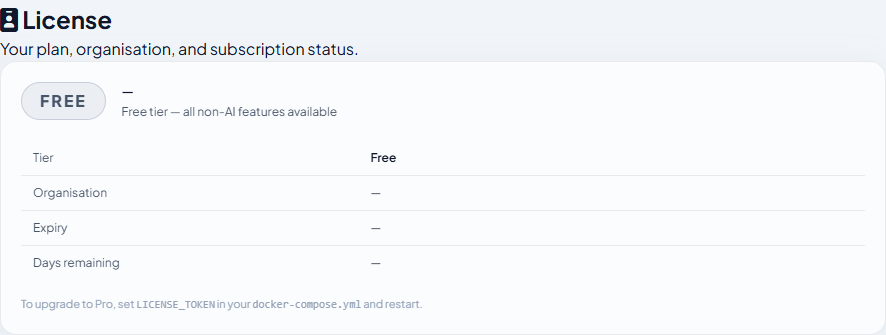
- The sidebar badge changes to PRO and Settings → License shows your organisation name and expiry date.
Trial licenses
A trial is a Pro license with a future expiry date — no special configuration, same activation steps. The Settings → License panel shows the number of days remaining.
| Period | Behaviour |
|---|---|
| During trial | Full Pro — all AI features active |
| 7 days before expiry | Dismissible yellow banner prompts renewal |
| Expiry day | Grace period begins |
| Grace period (7 days post-expiry) | Full Pro continues; banner persists |
| After grace period | Silently downgrades to Free — all data remains accessible and exportable |
Renewal is handled by your supplier, who updates the expiry server-side. No action is required from you — the app picks up the extension on its next 24-hour validation check.
AI feature gate on Free tier
When you click an AI button without a Pro license, Conio shows an inline upgrade prompt instead of making any AI call. No quota is consumed and no error is shown.

Offline grace
Both license validation and version checks cache their last successful result locally. If your internet connection is unavailable:
- The cached result is honoured for 7 days.
- After 7 days offline without a successful re-validation, Pro downgrades to Free until connectivity is restored.
- The app itself never locks — all data remains accessible and exportable regardless of license state.