Template Library
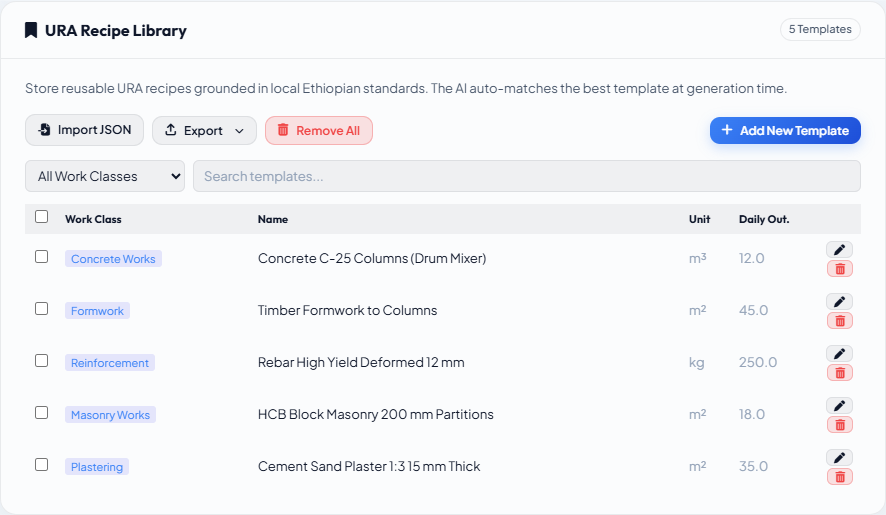
The Template Library stores pre-verified resource breakdowns (materials, labour, equipment) for known work types. Templates are the backbone of consistent, scalable URA generation — once a template exists for a work type, every future item of the same type can be built from it rather than generated cold from scratch.
Templates are project-level (global). A template seeded in one scenario is immediately available to all other scenarios in the same project.
Accessing the Template Library
Go to Settings → Recipe Library. The library lists all templates with their name, unit, keyword string, and creation date.
How templates are used at generation time
When you generate a URA for a BOQ item, Conio looks up the Template Library and selects how to use the best matching template based on a Jaccard score:
| Score | Tier | How the template is used |
|---|---|---|
| 1.0 (definitive link) | Definitive | Template adopted verbatim — no AI call. Resources re-priced from the current price book only. |
| ≥ 0.65 | Baseline | AI keeps the resource makeup; adjusts quantities, crew sizes, and usage factors only |
| 0.30 – 0.65 | Starting point | AI uses the closest recipe as a starting point; may add, remove, or substitute resources |
| < 0.30 | Cold | No template is close enough; AI generates from scratch |
The Baseline and Starting point tiers ensure the AI adapts an existing recipe rather than inventing a new one. The Definitive tier (score = 1.0) is produced when the matched rate row was exported from the Template Library — see Exporting.
Writing good keywords
Template keywords are the primary signal for template matching. Generic, trade-level terms that appear in any BOQ description for that work type — regardless of project-specific wording — produce the best cross-project coverage.
| Too specific (raw phrase) | Broadly matchable (generic) |
|---|---|
Excavation in hard rock by blasting m/c | rock excavation, blasting, hard rock, ripping |
C-25 concrete for columns using drum mixer | concrete, c-25, columns, drum mixer, in-situ |
Cement sand plaster 1:3 to walls | plastering, cement plaster, sand render, wall, ceiling |
Keywords generated by AI Refine during the seeding workflow are already generic by design. If you promote a URA manually (without going through seeding), you may need to edit the keywords.
Editing keywords
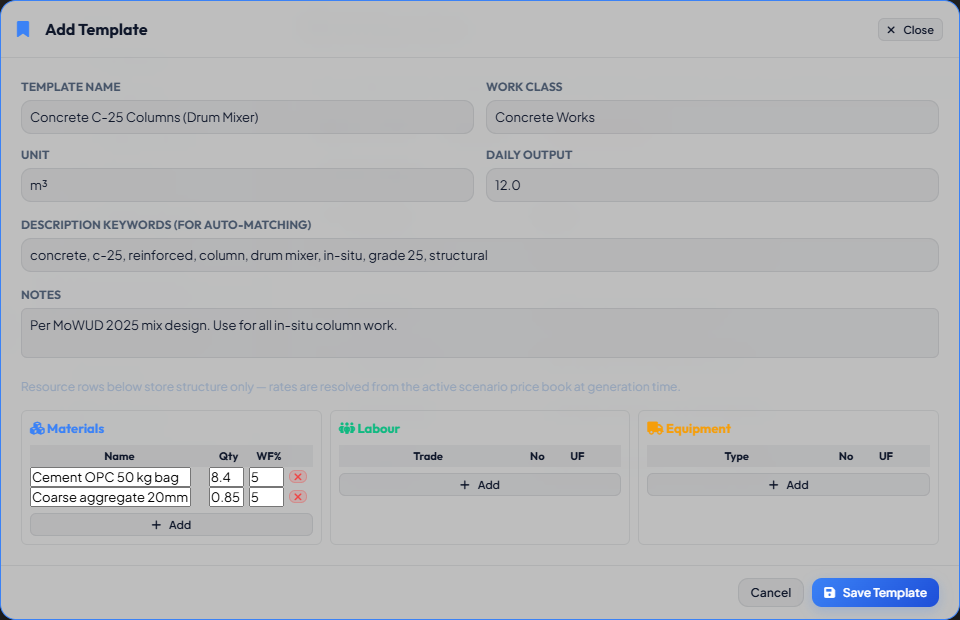
- In the Template Library, click the edit icon on a template row (or click the row to open the edit modal).
- Find the Keywords field.
- Enter a comma-separated list of generic trade terms.
- Click Save.
Importing templates from CSV
If you have a set of verified URA templates from a previous project or a standard library, you can import them directly:
- In the Template Library toolbar, click Import → Templates (JSON or CSV).
- Select your file. The required columns are:
name,unit,keywords,materials,labour,equipment. - Rates are zeroed on import — they are resolved from the current project's active price book at generation time.
Before starting a new building project, import a standard template pack covering the most common work types (Concrete, Formwork, Reinforcement, Masonry, Plastering, Earthworks). This gives the Coverage Analysis a head start and reduces the number of templates that need seeding from scratch.
Exporting templates
Templates can be exported as JSON for sharing between projects:
- Click Export → Templates (JSON) in the toolbar.
- Rates are zeroed in the export. The receiving project resolves rates from its own price book.
To export templates as a Rate Table (with optional pricing), see Exporting.